

UV DTF transfer is transforming how small businesses print on demand, delivering vibrant, durable designs with minimal setup. This method blends high-resolution color with a practical DTF transfer workflow that appeals to startups and micro businesses pursuing on-demand customization. From apparel to mugs and beyond, UV DTF transfer offers in-house control over quality and lead times for accessible small business printing solutions. Understanding the costs and trade-offs involved helps you price reliably while protecting margins. This guide helps you decide whether this approach fits your product line and growth goals.
In practical terms, this technology uses UV-curable inks printed onto a transfer film before being fused to textiles and other substrates. Think of it as in-house print-on-demand with durable, vibrant results that empower small studios to offer customized merchandise without outsourcing. To optimize a workflow, designers focus on color management, substrate compatibility, and a reliable transfer process that keeps costs predictable. Getting started often means mapping a path from affordable UV printer setup to efficient post-print finishing and quality checks. With the right setup, you can compete with larger shops by delivering fast turnarounds and margin-friendly prices.
UV DTF transfer costs: budgeting for startup and ongoing expenses for small business printing solutions
When you’re evaluating UV DTF transfer as a growth option for your shop, the first consideration is the overall cost of entry and the ongoing investments required to stay competitive. UV DTF transfer costs include the printer itself, any integrated or separate curing system, a reliable heat press, and the software needed to design, RIP, and manage color profiles. Budgeting for these components upfront helps you set realistic pricing and protect margins, especially for startups that must balance cash flow with demand.”
In addition to the initial outlay, anticipate ongoing expenses such as inks or UV-curable inks, transfer films, adhesive powders, cleaning supplies, and substrates. Plan for routine maintenance, parts replacement, and occasional service visits. A sound pricing strategy—often a cost-plus model with tiered options for single designs, bulk runs, and rush jobs—depends on understanding these costs to sustain profitability while offering competitive small business printing solutions.
Getting started with UV DTF printer setup: laying a solid foundation for in-house production
A practical UV DTF printer setup starts with selecting a compact, reliable printer that can consistently produce transfer films using UV-curable inks. Consider whether your kit includes an inbuilt curing mechanism or if you’ll rely on a separate UV curing station. This choice affects your workflow, space planning, and energy usage, so map out a layout that minimizes handling and streamlines the print-to-transfer sequence.
Next, address essential setup elements such as a compatible heat press, drying rack, and workspace organization. Calibrate color management using ICC profiles and ensure your RIP software is synchronized with the printer’s capabilities. Proper ventilation, a clean work surface, and a defined maintenance schedule will reduce misprints and extend equipment life, forming the backbone of a reliable UV DTF transfer operation.
DTF transfer workflow: steps to maximize efficiency and consistency
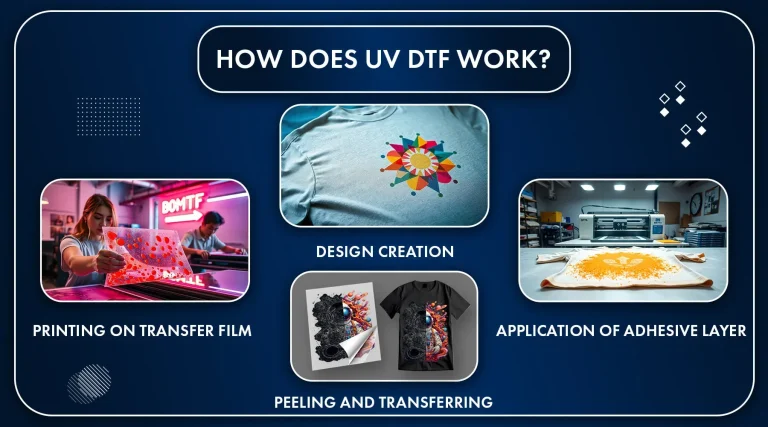
A well-defined DTF transfer workflow is the backbone of predictable results in a small shop. Start with design and prepress, ensuring high-resolution artwork and accurate color management so the final transfer matches customer expectations. Establish a clean path from file to film, keeping dust and debris off the transfer sheet to minimize rejects.
The core workflow then proceeds to printing, curing, and transfer application. Maintain strict quality control at each stage—verify color accuracy, film integrity, and adhesive behavior before the transfer goes to the substrate. Document the process and standardize dwell times, temperatures, and pressure to reduce variability across batches, which is critical for delivering consistent, reliable products to customers.
UV DTF vs standard DTF: choosing the right method for your small business
Understanding UV DTF vs standard DTF helps you align technology with business goals. UV DTF typically offers vibrant color, fast curing, and strong durability on a range of substrates, which can translate into higher perceived value for on-demand products. However, you’ll want to weigh these benefits against equipment costs, maintenance, and the availability of compatible films and inks.
When comparing methods for a small business printing solution, consider lead times, production complexity, and target markets. Standard DTF might be sufficient for straightforward designs or lower-budget projects, while UV DTF can deliver crisper images on challenging substrates and reduce post-processing steps. The decision often comes down to your product mix, desired turnaround, and the total cost of ownership across the lifespan of your equipment.
Small business printing solutions: expanding product lines with UV transfers
UV DTF transfers open opportunities to diversify your product assortment without heavy minimums. Start by testing a focused range—like cotton tees, mugs, and tote bags—and gradually expand based on customer demand. The ability to offer on-demand customization aligns well with small business printing solutions, allowing you to minimize waste while meeting individual customer specs.
As you scale, consider integrating complementary offerings such as personalized packaging, event merchandise, and limited-edition runs. Building a color library and reusable design templates helps you maintain consistency and speed across orders, turning UV DTF transfer into a scalable capability rather than a one-off service. This approach supports sustainable growth by balancing new product development with proven, revenue-generating items.
Practical tips to optimize UV DTF transfers for cost efficiency and quality
To maximize quality while protecting margins, invest in strong color management and test batches. Create a library of color profiles for common fabrics and substrates, so your designs reproduce accurately with minimal trial-and-error. Regular calibration and routine maintenance of the printer and curing equipment reduce color drift, misalignment, and wasted materials.
In addition, optimize workflow efficiency by standardizing SOPs, prepress checks, and batch documentation. Use small-batch runs to validate new designs before larger orders, and monitor wear on transfer films and mats to prevent scuffs or edge artifacts. Finally, prioritize worker safety with proper ventilation, PPE, and adherence to supplier guidelines for inks and substrates to maintain a safe, productive work environment.
Frequently Asked Questions
What is UV DTF transfer and why is it advantageous for small business printing solutions?
UV DTF transfer uses UV-curable inks printed on a transfer film, then cured with UV light to fuse the design into textiles and other substrates. For small business printing solutions, it enables on-demand customization, shorter lead times, and in-house control over design, production, and margins, with durable, vibrant results.
What are UV DTF transfer costs and what should a startup budget for?
Initial investments include a UV DTF printer setup, a heat press, and a curing option (if not built in), plus software. Ongoing costs cover inks, transfer films, adhesive powders, substrates, and routine maintenance. Use a simple cost-per-unit model to estimate ROI and plan for margins, with room for expansion of your small business printing solutions.
How do you perform a proper UV DTF printer setup for reliable operations?
Begin with installation, calibrate color profiles, and verify curing parameters. If your printer includes an integrated UV curing unit, configure it for the recommended dwell time; otherwise, use a reliable UV lamp and ventilation. Document SOPs for calibration, maintenance, and safety to sustain consistency.
DTF transfer workflow: what are the essential steps to maximize efficiency in UV DTF production?
Key steps include design and prepress with color management; printing with careful alignment and dust control; curing and finishing with powder or adhesive as required; transfer application with correct heat, pressure, and time; followed by quality control and secure packaging.
UV DTF vs standard DTF: how do they compare for small business printing solutions?
UV DTF uses UV-curable inks and often a faster cure, delivering durable, vibrant results with strong adhesion on a range of substrates. Standard DTF typically relies on different inks and powders and may require longer processing times. For small business printing solutions, UV DTF can offer greater control, faster turnarounds, and potentially higher margins—choose based on substrate compatibility, color fidelity, and budget.
What are common challenges in UV DTF transfer and how can small businesses overcome them within the DTF transfer workflow?
Common issues include color drift, misalignment, weak adhesion on some substrates, ghosting, and damaged films. Solutions involve recalibrating printers, updating color profiles, testing on representative blanks, adjusting heat, time, and pressure, and careful film handling. Maintain equipment, store films properly, and follow the DTF transfer workflow to minimize waste.
| Aspect | Key Points (Summary) | Notes for UV DTF Transfer |
|---|---|---|
| What UV DTF transfer is and why it matters. | Uses UV-curable inks printed on transfer film; heat to fuse; produces vibrant colors, sharp details, and durability on textiles and other substrates; enables on-demand customization with low minimums and in-house production. | Good fit for small businesses aiming to expand customization and control production. |
| Costs – Initial investment. | Printer, heat press, and a curing option (integrated or separate); software or RIP may be included or needed; costs vary by brand and kit. | Plan for upfront capital and choose equipment that fits a small shop budget. |
| Costs – Ongoing costs. | Consumables (inks, transfer films, adhesive powders); substrates; routine maintenance; and utilities. | Budget for regular restocking, maintenance, and energy use. |
| ROI and pricing considerations. | ROI depends on steady on-demand orders and in-house control; use a simple cost-plus model and consider tiered pricing, bulk discounts, and rush fees. | Aim for margins that reflect material, energy, and depreciation costs. |
| Setup: equipment and layout. | Printer with curing option, a reliable heat press, drying rack, and organized workspace for efficient production. | Plan space to minimize moves and misfeeds; ensure proper ventilation and safe handling. |
| Materials and color management. | Transfer film and adhesives; inks with color profiles; ICC references; substrate compatibility; perform small test batches before large runs. | Partner with suppliers offering color management resources and test substrates. |
| Setup steps (quick-start). | Define target products and volume; install and calibrate printer; prepare heat press workflow; create or import color profiles; run test prints; apply transfers; verify color accuracy and substrate compatibility; document SOPs. | Follow these steps to establish repeatable, scalable production. |
| Workflow: how to maximize efficiency. | Design and prepress with color management; printing; curing/finishing; transfer application; quality control; packaging and fulfillment. | Maintain a clean print path and standardized procedures to reduce waste and rework. |
| Tips and best practices for small businesses. | Start with a tight product line; run small batches; build a color library; invest in training; monitor wear and maintenance; emphasize safety and ventilation. | Gradually expand as you validate demand and gain proficiency. |
| Common challenges and how to overcome them. | Color drift or misalignment: recalibrate printers and verify color profiles; poor adhesion on substrates: pre-test and adjust heat, time, or pressure; ghosting: check film quality and curing; damaged films: store and handle properly. | Address issues with proactive testing and good preventive maintenance. |
| Why UV DTF can be a smart fit for small business printing solutions. | Offers control over quality, lead times, and customization; in-house capability reduces turnaround and increases margins; requires reliable materials and a repeatable process. | Invest in solid setup and workflow to unlock scalable, high-quality production. |
Summary
UV DTF transfer offers a practical pathway for small businesses seeking to expand product offerings with durable, vibrant transfers. By understanding costs, establishing a clear setup plan, and refining the production workflow, shop owners can achieve faster turnaround times, greater design control, and higher margins on customized items. With careful budgeting for consumables, an organized workspace, and reliable equipment, UV DTF transfer enables on-demand customization while maintaining quality. This approach helps micro-businesses compete with larger players by delivering consistently professional results and scalable production.